AlphaSOC Data Lake for Cribl Search
This guide explains how to query records in the AlphaSOC Data Lake directly from Cribl Search. The integration uses three Cribl Search objects:
- A Generic HTTP API dataset provider connects to the AlphaSOC Data Lake API.
- A custom datatype separates the newline-delimited JSON (NDJSON) response into events and extracts their timestamps.
- A federated dataset makes the processed AlphaSOC records available to searches.
Prerequisites
Before you begin, make sure you have:
- Access to Cribl Search with permission to create dataset providers, datatypes, and datasets.
- An AlphaSOC API key from the AlphaSOC Console.
- AlphaSOC Data Lake access. If the API returns
403 Forbiddenwith a message that the product is not enabled, contact AlphaSOC Support.
Create the Dataset Provider
-
In Cribl Search, navigate to Data > Dataset Providers and select Add Provider.
-
Configure the provider:
- Set ID to a unique name (example:
alphasoc_datalake_api). - Dataset Provider Type: Generic HTTP API
- Set ID to a unique name (example:
-
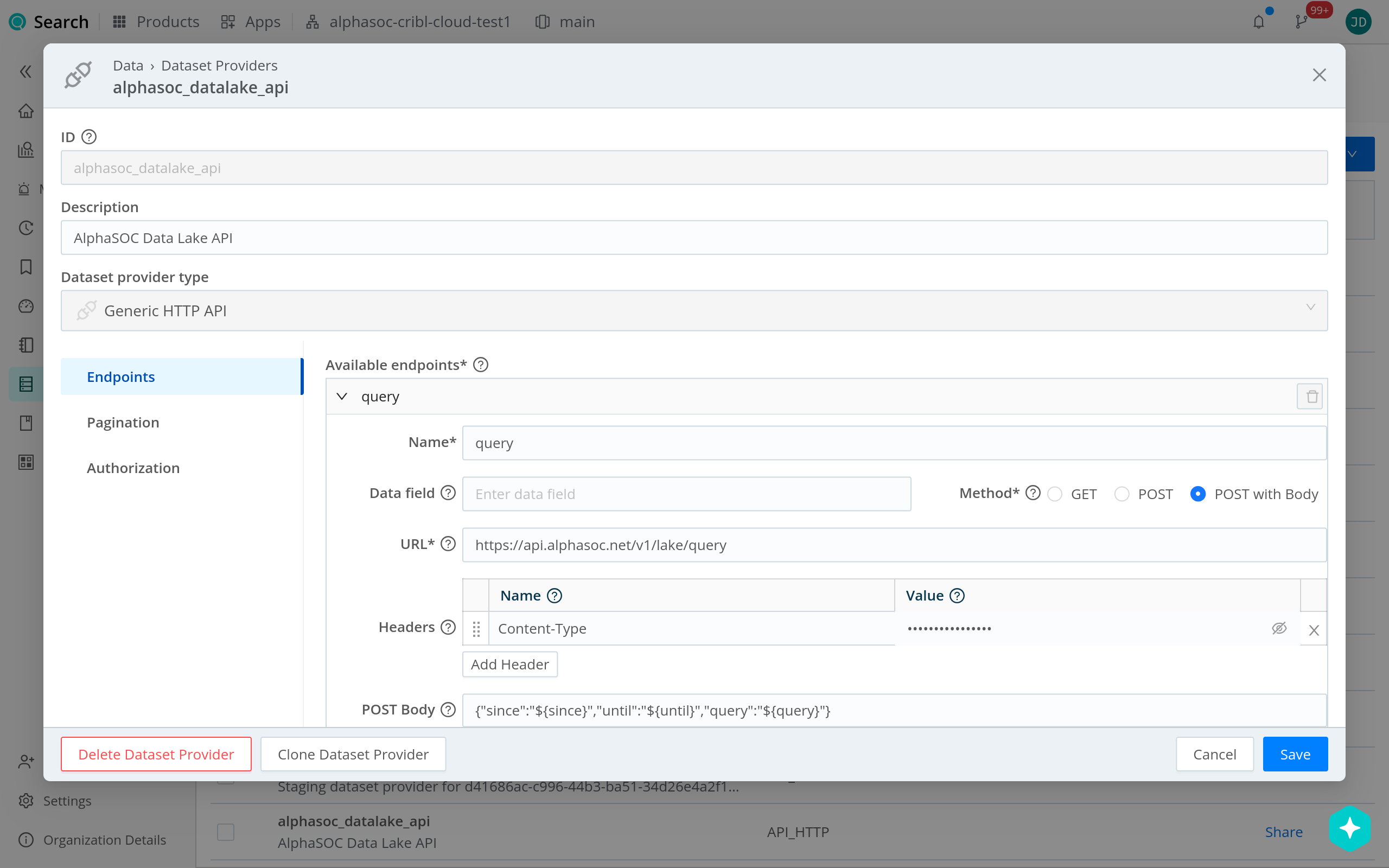
Under Endpoints, add an endpoint with the following settings:
- Set Name to a unique name (example:
query). - Data field: Leave empty.
- Method: POST with Body
- URL:
https://api.alphasoc.net/v1/lake/query - Headers: Add
Content-Typewith the valueapplication/json. - POST Body:
{"since":"${since}","until":"${until}","query":"${query}"}Leave Data field empty because the API streams NDJSON instead of returning a JSON array or an object containing an array. The custom datatype created in the next section separates this stream into events.
- Set Name to a unique name (example:
-
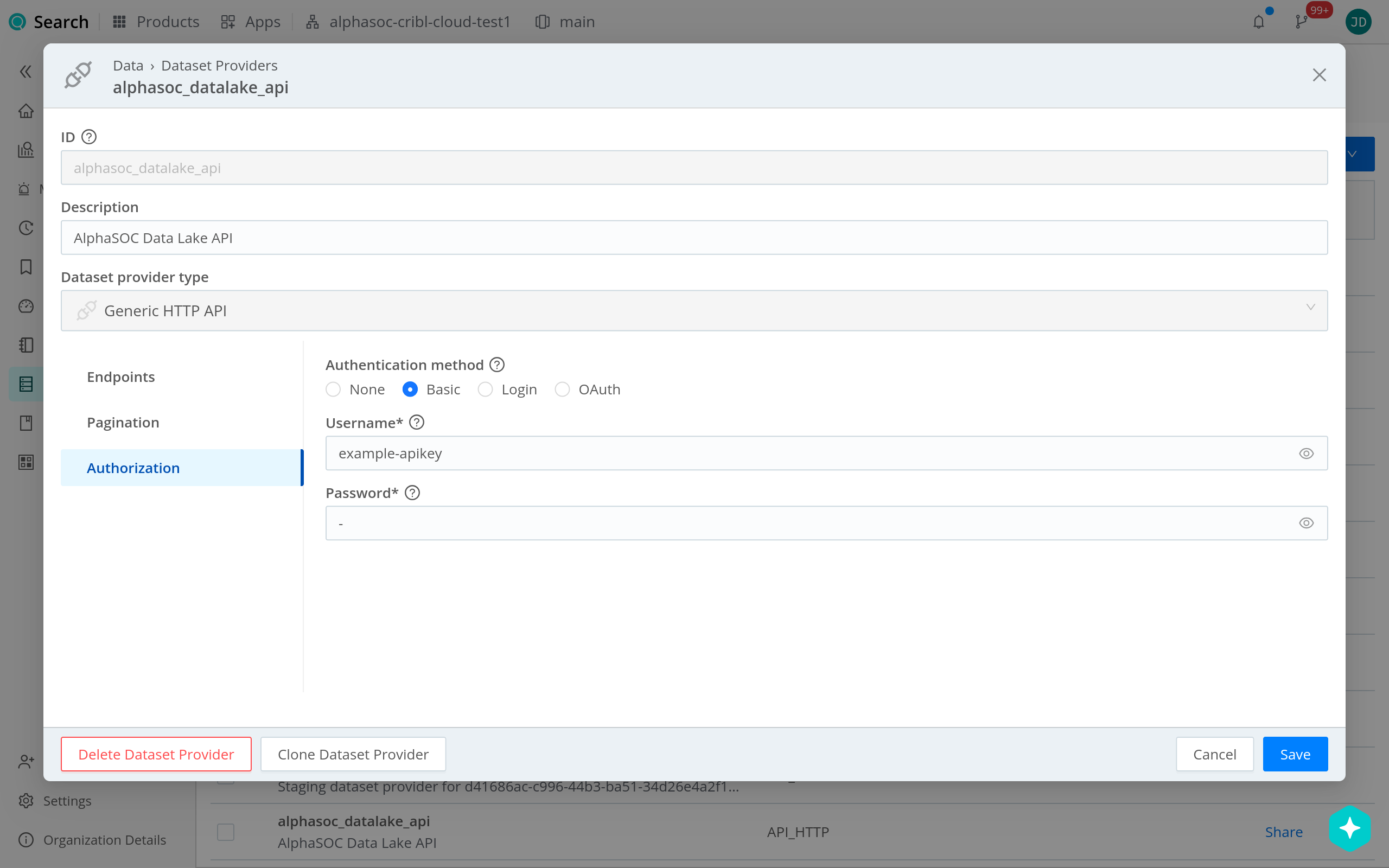
Under Authorization, configure the following settings:
- Authentication method: Basic
- Username: Your AlphaSOC API key.
- Password:
-
The API key is sent as the HTTP Basic username. Enter a single hyphen (
-) as the password.
- Select Save.
Create the Datatype
The AlphaSOC Data Lake API returns one result per line, and each result wraps
its OCSF record in a data object, for example:
{"data":{"class_name":"DNS Activity","time_dt":"2026-08-26T12:00:00Z"}}
Create a custom datatype to separate the response into events and use each
record's data.time_dt value as its timestamp:
-
In Cribl Search, navigate to Data > Datatypes and select Add Datatype.
-
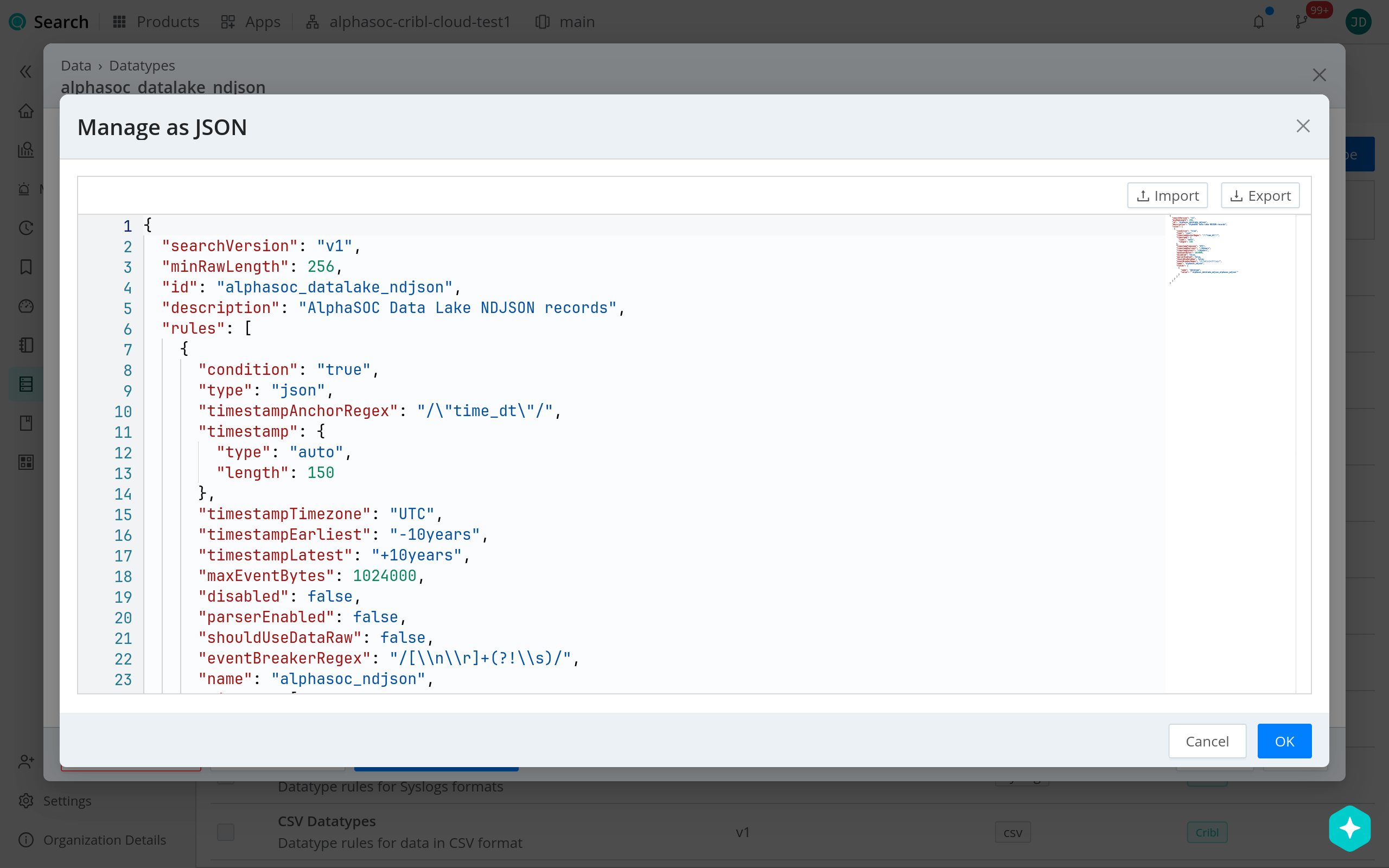
Select Manage as JSON.
-
Replace the contents of the JSON editor with the following configuration:
{
  "id": "alphasoc_datalake_ndjson",
  "minRawLength": 256,
  "rules": [
    {
      "condition": "true",
      "type": "json",
      "timestampAnchorRegex": "/\"time_dt\"/",
      "timestamp": {
        "type": "auto",
        "length": 150
      },
      "timestampTimezone": "UTC",
      "timestampEarliest": "-10years",
      "timestampLatest": "+10years",
      "maxEventBytes": 1024000,
      "disabled": false,
      "parserEnabled": false,
      "shouldUseDataRaw": false,
      "eventBreakerRegex": "/[\\n\\r]+(?!\\s)/",
      "name": "alphasoc_ndjson",
      "fields": [
        {
          "name": "datatype",
          "value": "'alphasoc_datalake_ndjson'"
        }
      ]
    }
  ],
  "searchVersion": "v1"
}The
idand rulenamevalues are suggestions. You can replace them with unique names. If you changeid, also change the quoted value infields[0].valueto the same name.
- Apply the JSON configuration, then select Save.
Create the Federated Dataset
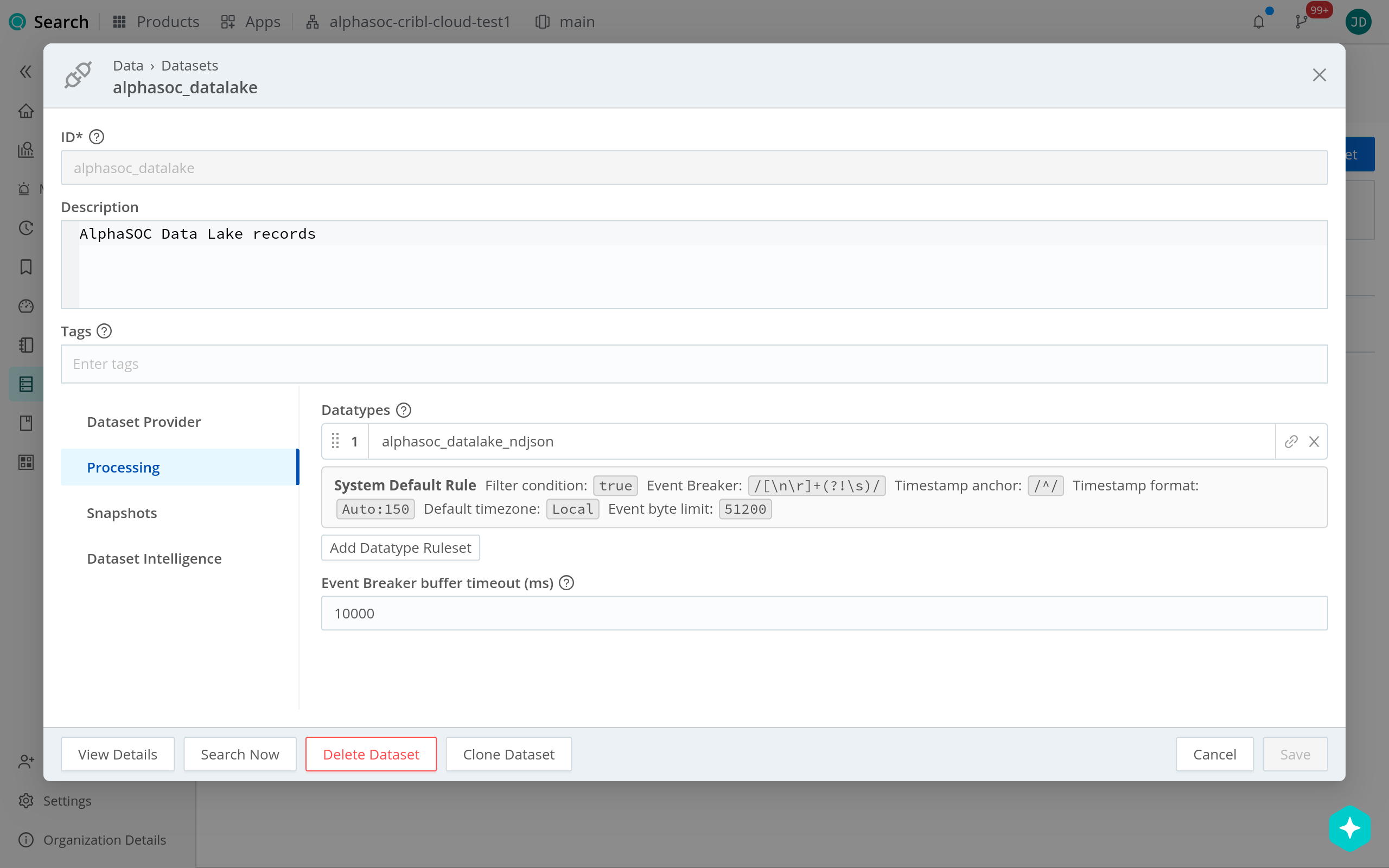
- In Cribl Search, navigate to Data > Datasets and select Add Dataset.
- Select Federated Dataset.
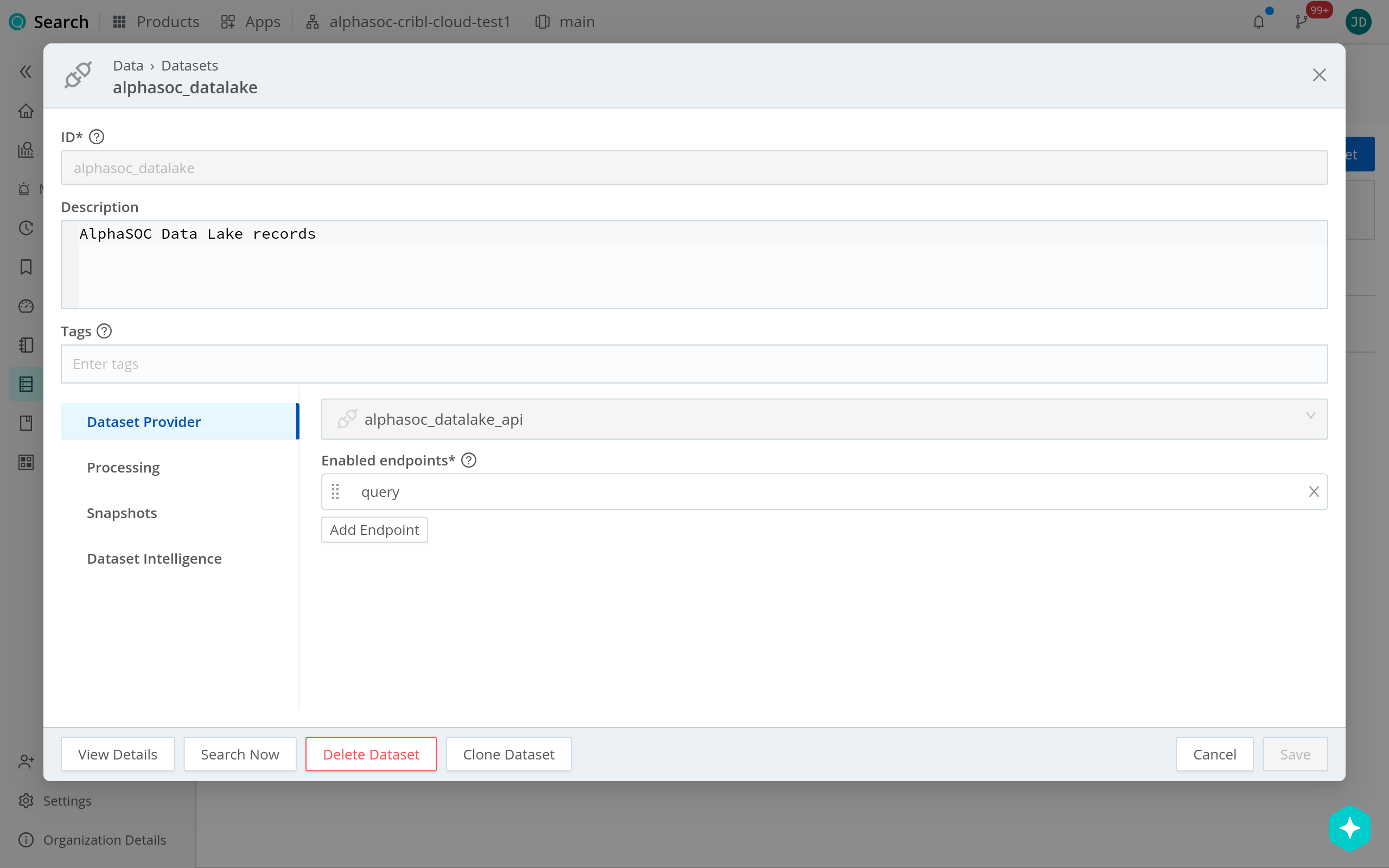
- Configure the dataset:
- Set ID to a unique name (example:
alphasoc_datalake). - Dataset Provider: Select the provider you created earlier (for
example,
alphasoc_datalake_api). - Enabled endpoints: Select the endpoint you created earlier (for
example,
query).
- Set ID to a unique name (example:
- Under Processing, add the datatype you created earlier (for example,
alphasoc_datalake_ndjson). This separates the response into events and extracts their timestamps. - Leave the other dataset settings at their defaults, then select Save.
Query the AlphaSOC Data Lake
Every search of the federated dataset must explicitly provide the following parameters:
since: The inclusive beginning of the query window, formatted as an RFC 3339 timestamp.until: The inclusive end of the query window, formatted as an RFC 3339 timestamp. It must be later thansince.query: An AlphaSOC Data Lake command beginning withevent,evidence, oractivity, followed by selectors and OCSF filters. See Searching the Data Lake for the syntax and value rules.
Cribl does not pass the time picker range to the since and until parameters.
These parameters control which records the AlphaSOC API returns, while the time
picker independently filters those records in Cribl. Set the time picker to the
same range or a range that fully covers the since–until interval. If the
ranges only partially overlap, Cribl displays only records in the intersection;
if they do not overlap, the search returns no records.
The AlphaSOC Data Lake API does not process Cribl KQL. Include all filters that
the API should apply inside the query parameter. You can then use Cribl KQL
operators after the pipe (|) to process the records returned by the API. For
example, the AlphaSOC command filters DNS activity for example.com, while the
Cribl operator summarizes the returned records:
dataset="alphasoc_datalake"
since="2026-08-26T12:00:00Z"
until="2026-08-26T13:00:00Z"
query="event class_name=dns_activity query.hostname=example.com"
| summarize count() by data.device.ip
In the query parameter, reference OCSF fields without the data prefix. In
Cribl KQL, reference fields returned by the API under their data paths.
Verify the Integration
In Cribl Search, run the following search. Replace the timestamps with a period
when your workspace received data. If you used a different dataset ID, replace
alphasoc_datalake with that ID.
dataset="alphasoc_datalake"
since="2026-08-26T12:00:00Z"
until="2026-08-26T13:00:00Z"
query="event"
Confirm that the search returns records, that each record is a separate event
with _time taken from data.time_dt, and that datatype contains
alphasoc_datalake_ndjson. Because the API wraps each OCSF record in a data
object, OCSF fields are searchable under paths such as data.class_name,
data.device.ip, and data.query.hostname.