BigQuery
Overview
This document outlines the process for configuring the Google BigQuery to receive findings from AlphaSOC. The integration enables you to store, analyze, and visualize AlphaSOC's findings within your BigQuery environment.
To receive findings, set up the following Google BigQuery resources:
- Project that will host the dataset and table.
- Dataset that will organize the data.
- Table with configured table schema and table query that will store the findings.
- IAM permissions that enable secure data transmission from AlphaSOC.
To enable integration, provide the following configuration details to AlphaSOC:
- Project ID.
- Dataset name.
- Table name.
Configuring Table Schema
Enable "Edit as text" toggle and insert the following JSON configuration:
[
  {
    "mode": "NULLABLE",
    "name": "eventType",
    "type": "STRING"
  },
  {
    "fields": [
      {
        "mode": "REQUIRED",
        "name": "ts",
        "type": "TIMESTAMP"
      },
      {
        "mode": "NULLABLE",
        "name": "srcIP",
        "type": "STRING"
      },
      {
        "mode": "NULLABLE",
        "name": "srcPort",
        "type": "INTEGER"
      },
      {
        "mode": "NULLABLE",
        "name": "srcHost",
        "type": "STRING"
      },
      {
        "mode": "NULLABLE",
        "name": "srcMac",
        "type": "STRING"
      },
      {
        "mode": "NULLABLE",
        "name": "srcUser",
        "type": "STRING"
      },
      {
        "mode": "NULLABLE",
        "name": "srcID",
        "type": "STRING"
      },
      {
        "mode": "NULLABLE",
        "name": "connID",
        "type": "STRING"
      },
      {
        "mode": "NULLABLE",
        "name": "dataOrigin",
        "type": "STRING"
      },
      {
        "mode": "NULLABLE",
        "name": "dataScope",
        "type": "STRING"
      },
      {
        "mode": "NULLABLE",
        "name": "destIP",
        "type": "STRING"
      },
      {
        "mode": "NULLABLE",
        "name": "destPort",
        "type": "INTEGER"
      },
      {
        "mode": "NULLABLE",
        "name": "proto",
        "type": "STRING"
      },
      {
        "mode": "NULLABLE",
        "name": "bytesIn",
        "type": "INTEGER"
      },
      {
        "mode": "NULLABLE",
        "name": "bytesOut",
        "type": "INTEGER"
      },
      {
        "mode": "NULLABLE",
        "name": "packetsIn",
        "type": "INTEGER"
      },
      {
        "mode": "NULLABLE",
        "name": "packetsOut",
        "type": "INTEGER"
      },
      {
        "mode": "NULLABLE",
        "name": "app",
        "type": "STRING"
      },
      {
        "mode": "NULLABLE",
        "name": "action",
        "type": "STRING"
      },
      {
        "mode": "NULLABLE",
        "name": "duration",
        "type": "FLOAT"
      },
      {
        "mode": "NULLABLE",
        "name": "query",
        "type": "STRING"
      },
      {
        "mode": "NULLABLE",
        "name": "qtype",
        "type": "STRING"
      },
      {
        "mode": "NULLABLE",
        "name": "url",
        "type": "STRING"
      },
      {
        "mode": "NULLABLE",
        "name": "method",
        "type": "STRING"
      },
      {
        "mode": "NULLABLE",
        "name": "status",
        "type": "INTEGER"
      },
      {
        "mode": "NULLABLE",
        "name": "contentType",
        "type": "STRING"
      },
      {
        "mode": "NULLABLE",
        "name": "referrer",
        "type": "STRING"
      },
      {
        "mode": "NULLABLE",
        "name": "userAgent",
        "type": "STRING"
      },
      {
        "mode": "NULLABLE",
        "name": "certHash",
        "type": "STRING"
      },
      {
        "mode": "NULLABLE",
        "name": "issuer",
        "type": "STRING"
      },
      {
        "mode": "NULLABLE",
        "name": "subject",
        "type": "STRING"
      },
      {
        "mode": "NULLABLE",
        "name": "validFrom",
        "type": "STRING"
      },
      {
        "mode": "NULLABLE",
        "name": "validTo",
        "type": "STRING"
      },
      {
        "mode": "NULLABLE",
        "name": "ja3",
        "type": "STRING"
      },
      {
        "mode": "NULLABLE",
        "name": "ja3s",
        "type": "STRING"
      },
      {
        "mode": "NULLABLE",
        "name": "labels",
        "type": "STRING"
      },
      {
        "mode": "NULLABLE",
        "name": "auditType",
        "type": "STRING"
      },
      {
        "mode": "NULLABLE",
        "name": "auditBody",
        "type": "RECORD",
        "fields": [
          {
            "mode": "NULLABLE",
            "name": "ip",
            "type": "STRING"
          },
          {
            "mode": "NULLABLE",
            "name": "requester",
            "type": "RECORD",
            "fields": [
              {
                "mode": "NULLABLE",
                "name": "ip",
                "type": "STRING"
              },
              {
                "mode": "NULLABLE",
                "name": "userAgent",
                "type": "STRING"
              },
              {
                "mode": "NULLABLE",
                "name": "identityType",
                "type": "STRING"
              },
              {
                "mode": "NULLABLE",
                "name": "identityARN",
                "type": "STRING"
              }
            ]
          },
          {
            "mode": "NULLABLE",
            "name": "resource",
            "type": "RECORD",
            "fields": [
              {
                "name": "bucketName",
                "type": "STRING",
                "mode": "NULLABLE"
              }
            ]
          },
          {
            "mode": "NULLABLE",
            "name": "action",
            "type": "STRING"
          }
        ]
      },
      {
        "name": "rcode",
        "type": "STRING",
        "mode": "NULLABLE"
      }
    ],
    "mode": "NULLABLE",
    "name": "event",
    "type": "RECORD"
  },
  {
    "mode": "REPEATED",
    "name": "threats",
    "type": "STRING"
  },
  {
    "fields": [
      {
        "mode": "REPEATED",
        "name": "flags",
        "type": "STRING"
      },
      {
        "mode": "REPEATED",
        "name": "labels",
        "type": "STRING"
      },
      {
        "mode": "NULLABLE",
        "name": "domain",
        "type": "STRING"
      },
      {
        "mode": "NULLABLE",
        "name": "trusted",
        "type": "BOOLEAN"
      },
      {
        "mode": "NULLABLE",
        "name": "whois",
        "type": "RECORD",
        "fields": [
          {
            "mode": "NULLABLE",
            "name": "creationTime",
            "type": "TIMESTAMP"
          }
        ]
      }
    ],
    "mode": "NULLABLE",
    "name": "wisdom",
    "type": "RECORD"
  },
  {
    "fields": [
      {
        "name": "id",
        "type": "STRING"
      },
      {
        "name": "key",
        "type": "STRING"
      },
      {
        "name": "severity",
        "type": "INTEGER"
      },
      {
        "mode": "REPEATED",
        "name": "observations",
        "type": "STRING"
      }
    ],
    "mode": "REPEATED",
    "name": "detections",
    "type": "RECORD"
  },
  {
    "mode": "NULLABLE",
    "name": "rawEvent",
    "type": "JSON"
  },
  {
    "mode": "REPEATED",
    "name": "mitreAttack",
    "type": "STRING"
  },
  {
    "mode": "NULLABLE",
    "name": "id",
    "type": "STRING"
  }
]
Configuring Table Query
Replace the following placeholders with the appropriate resource identifiers.
{{PROJECT_ID}}- ID of your project{{DATASET_NAME}}- name of your dataset{{TABLE_NAME}}- name of your table
Enter the modified query in the query editor:
SELECT * FROM `{{PROJECT_ID}}.{{DATASET_NAME}}.{{TABLE_NAME}}` LIMIT 1000
Adding IAM Permissions
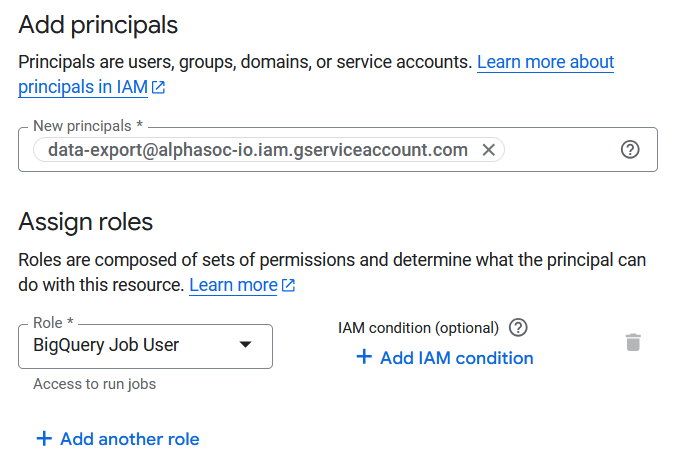
Configure the IAM permissions as shown below, using
data-export@alphasoc-io.iam.gserviceaccount.com as the principal. IAM
conditions can be optionally configured to specify AlphaSOC's resource access
scope. For implementing IAM conditions, refer to
IAM conditions documentation.